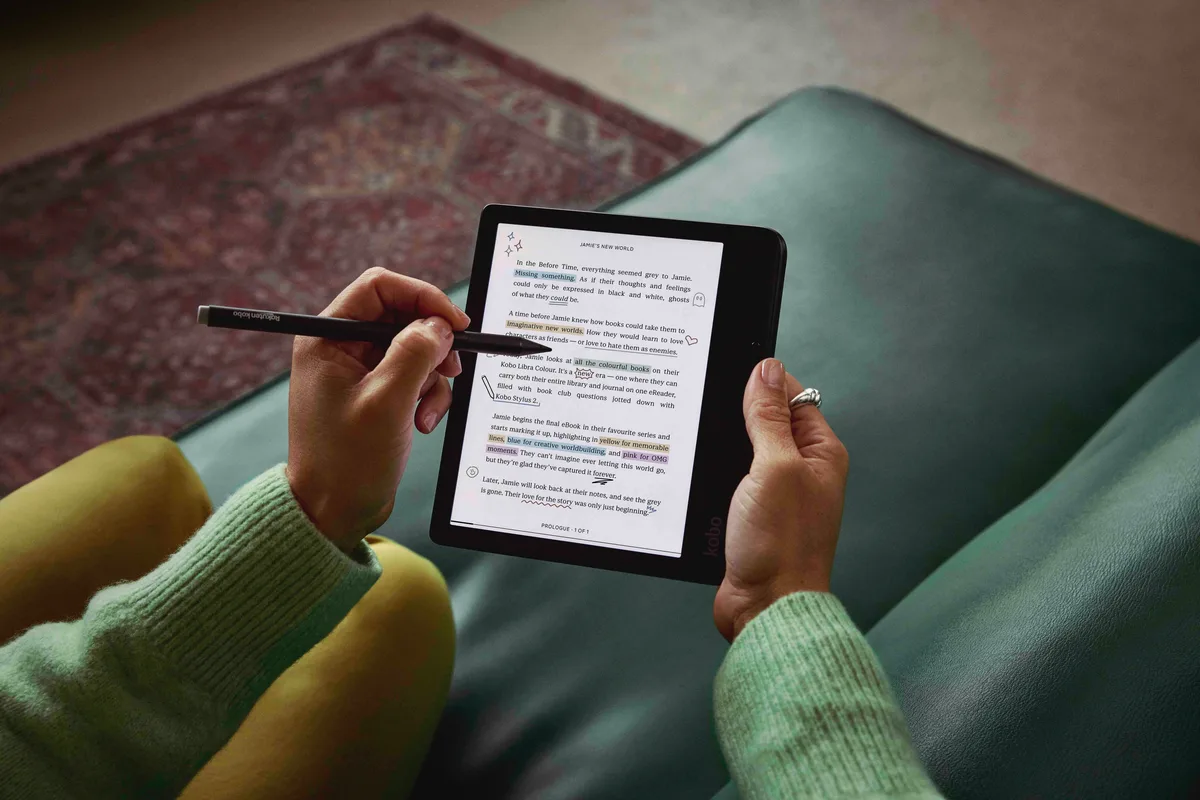
Color covers are fun. Page buttons can matter on every page. That is the key to this Kobo Libra Colour review: buy it for the way you want to read, not just the promise of a color screen.
The Kobo Libra Colour has a 7-inch screen. It adds page buttons and pen support. It is a book reader first. Do not expect a tiny tablet for video, apps, or full-size art books.
Kobo Libra Colour: the key details
| Feature | What you get |
|---|---|
| US price checked September 2026 | $259.99, before tax and extras |
| Screen | 7-inch E Ink Kaleido 3 |
| Resolution | 300 ppi for black and white, 150 ppi for color |
| Storage | 32 GB |
| Weight | 199.5 grams without a cover |
| Page controls | Touch screen and page-turn buttons |
| Light | Adjustable brightness and warm tone |
| Water rating | IPX8 |
| Pen support | Kobo Stylus 2, sold separately |
| Charging | USB-C |
The color screen has a trade-off
The Kobo Libra Colour uses color E Ink. Its colors look soft on book covers and charts. They do not glow like the colors on a phone or tablet. Think of ink on paper, not a bright video display.
That can suit a quiet reading device. A color mark can help sort your notes. A cover can be easier to spot on the home screen. But color will not make a black-and-white book turn into an illustrated edition.
The two resolution figures matter. Black-and-white content uses 300 pixels per inch. Color uses 150. A small color detail may look less crisp than the black words beside it. For tiny labels on a chart, zooming may still be needed.
There is also the page background to consider. Color E Ink can look darker than a black-and-white display under the same light. Some readers are happy to raise the front light. Others would rather have a brighter page without doing so.
Do not judge the Kobo Libra Colour from a single studio photo. Light and camera settings can change the view. If possible, see the device in the kind of room where you read.
What readers say about the darker page
In a Kobo reader discussion about screen brightness, reactions split. Some owners like the softer, newspaper-like look. Others dislike the gray background or fine screen texture. Those are personal views. They do not speak for all readers.
Compare your own comfort. No review can promise you will love it. If a bright white page is your first concern, color may be the wrong trade. If color notes and page buttons are more useful to you, a small light adjustment may feel fair.
For a simpler black-and-white choice, our Kindle vs Paperwhite comparison explains the size, light, and price differences. Neither of those standard models offers the Libra Colour's page buttons.
Page buttons may be the best feature
The Kobo Libra Colour has a wider grip along one side, with two physical page buttons. That gives your thumb a place to rest away from the page. You can turn a page without tapping the words.
The screen can rotate for a left-hand grip. The buttons are useful if you change hands while reading. You can still use the touch screen. Choose the way that feels right.
This design may suit you even if you do not need color. The part you use hundreds of times in a novel may matter more than a cover you see for a moment.
Still, comfort is personal. A broad side grip takes more bag space than a narrow device of similar screen size. Add a cover and the total weight rises. Check the whole setup you intend to carry.
Stylus support costs extra
The Kobo Libra Colour works with the Kobo Stylus 2. You can use the pen for notes and marks on supported content, as well as notebooks. The pen costs extra. Add it to your budget if you want this Kobo for notes.
Kobo's Libra Colour support guide links to the device manual and pen guidance. Check the exact features for the files you use. Note and export rules can vary by file.
A stylus can be useful for brief book notes. A 7-inch screen leaves less room for a full page of handwriting than a larger writing device. If your main task is marking work documents, test the size with a sample file first.
Do not pay for a pen just because the screen supports one. You may be happy with touch controls and simple highlights. You can read on the Kobo Libra Colour without a pen.
Books, library loans, and your own files
Kobo supports common ebook formats, including EPUB and PDF. That gives you ways to read beyond one store. That does not mean every locked book will open. A file can have copy protection that a device does not support.
If you have a large library of Kindle purchases, do not assume those books will move straight to Kobo. Check the rights and format of the files you own before switching. Keep the cost of rebuilding a library separate from the price of the device.
The Kobo Libra Colour also supports file transfer through Google Drive and Dropbox. These are useful routes for compatible files. They do not turn it into a computer. A wide PDF may still be hard to read.
Library borrowing depends on your country, library, account, and title. Check local support before buying for that purpose. A friend's library setup is not proof that yours works the same way.
Subscription apps are another separate question. An ebook plan does not mean that its books can be loaded onto any e-reader. Our Everand vs Audible guide explains the difference between book access and books you keep.
Battery life and light settings
Kobo rates the Libra Colour for up to 40 days of battery life under its stated test conditions. Your reading time, light level, wireless use, and pen use can change that. Treat that as a guide. Your charge may not last that long.
You can change how bright and warm the light looks. A warm tone can be pleasant at night, but there is no single setting that suits all readers. Start low, then raise it until the page is clear in your room.
USB-C charging is handy for travel. Download what you want before you leave, and check that the books open without a connection. You need a link to get new books. You can then read saved books offline.
Is it good for comics and PDFs?
Color is an advantage for some comics, but size still sets a limit. A full page made for a large print book may have small text on a 7-inch display. Zooming and moving around the page can interrupt the story.
For comics with large panels and clear lettering, the Kobo Libra Colour could be a good fit. A larger screen may suit dense art books or charts. Color alone cannot fix a page that is too small.
The same point applies to school and work files. Try one real document, including a page with a chart. Do not base the purchase only on a neat cover image in a product listing.
Who should buy the Kobo Libra Colour?
The Kobo Libra Colour makes the most sense for a reader who wants several of its strengths together: physical buttons, a warm front light, color notes, and support for common ebook files.
It is less compelling if you only read plain novels and never mark a page. You would be paying for color technology that adds little to that task. A lower-cost black-and-white e-reader may leave more money for books.
Want pen notes? Add the stylus and cover to the cost. If you want library loans, check your library first. If you want a brighter white page, see a display unit before you buy.
Our Kobo Libra Colour review comes down to this: the buttons and book features make a stronger case than color alone. Buy the combination because it fits how you read. Do not buy it expecting a tablet in a smaller shell.
Quick answers
Does the Kobo Libra Colour include a stylus?
No. The compatible Kobo Stylus 2 is sold separately. Include that extra cost if handwritten notes matter to you.
Can it show videos?
This is an e-reader for books, not a general video tablet. Choose it for reading and notes.
Will black-and-white books gain color?
No. The screen can show color that is in the content. It does not add color to a book that lacks it.
Is the Kobo Libra Colour worth it for novels?
It can be, especially if you value page buttons. But color itself adds little to the words in a plain novel. Compare comfort and price before making the choice.